FileVer is a tool that scans/updates a drive/path for selected files.
I wrote this tool because I wanted to search for DLL duplicates.
The tool can compare any type of files but for executables (EXE, DLL…) it retrieves the version of the file and uses this information.
If that is not available it compares file size.
It does NOT compare the contents of the files.
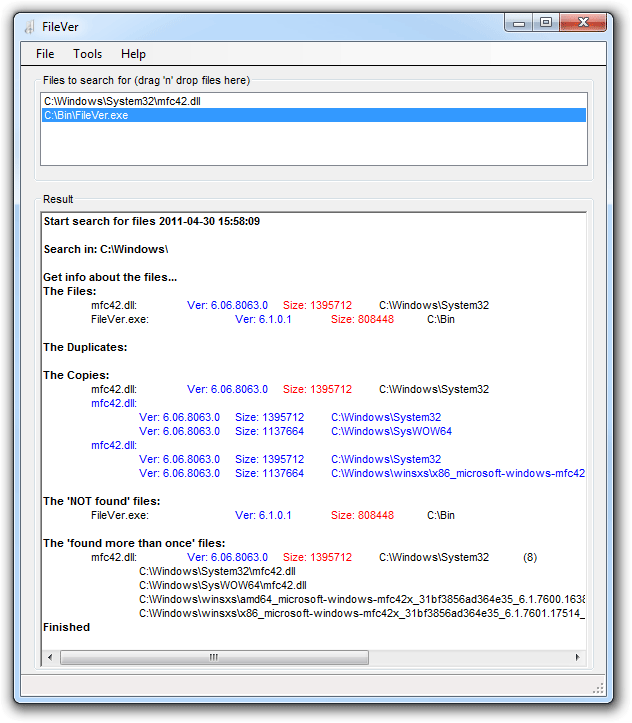
Functions
Locate Files/Versions
The typical use of this function is to search for a group of files. Drop the files in the upper part of the form and select "Locate Files/Versions". The program searches the specified path, and subdirectories for the files. All matches are listed with some information (version, size). When the search is over files located more than once and files not found at all are listed.
Update Files/Versions:
Basically the same as "Locate Files/Versions" but the found files are replaced. (DLL's are NOT unregistered/registered).
Path Part Search:
This function lets you search for part of paths. Ex: dows\syst will return all files in Windows\System and Windows\System32. Very useful if you are looking for all files named setup.exe located in a folder named Install (Install\setup.exe).
Install
I did not create any installation kit for this program.
Please let me know if you want one, and I will create one, if more than 1% of you want to have an installation kit.
You will need to have .net framework installed.
You can get this from windowsupdate or from MSDN Downloads.
Purchase?
The tool is completely free!
The No Design Software Team